This week we have been rewarded with yummy macaroons (delicious!!) in the staff room so I thought I better shake a leg and finally finish my e-books post!
I had a play with finding e-books on Newton...I used Literature Online a few years back but it was good to get a thorough refresher and have a nose at what Cambridge has to offer. Also interesting to have a browse through NHS e-books and see what they had in comparison. Lastly, I had a look at the most popular book as of yesterday on Project Guttenberg - "How to analyse people on sight" (Ooh er). Then I looked at "The tale of Peter Rabbit" to see how the quality of the illustrations differed to looking at them in paper format (answer = quality was good!) However, whilst I have used e-books in the past and would continue to be quite happy to dip into using them for work purposes, I don't think I'd like to read a book for pleasure on an e-book device. I think the novelty would wear thin for me. E-books are great if you haven't got access or time to nip into the library for the physical copy of the book. E-book readers and kindles are quite tempting but I think I prefer to read novels etc off-screen, for now! Although one would be handy on the move and would save me space on the bookshelf...anyone care to lend me one so I can try it out ;-) ?
Showing posts with label MedLib 23 things. Show all posts
Showing posts with label MedLib 23 things. Show all posts
Monday, 23 August 2010

Wednesday, 18 August 2010
Podcast outcast
I don't really listen to podcasts really, but I can see how they have their uses. They appear to have many more 'official' and professional uses tha youtube (my youtube post can be found here) I used to listen to podcasts on long plane journeys and I can imagine that they have the same beauty that sky plus now has for me, in that you can save up your episodes and then watch/listen to them when you want to, wherever you are. As the little video I watched proclaimed "when it comes to podcasts, showtimes don't matter."


I listened to a some podcasts on the BMJ site and these are the perfect example of a podcast that's interesting and informative and I can imagine these being popular with health professionals. Out of curiousity I then listened to a Medical Library podcast that I found on the University of Aberdeen website. Here, I got introducted to all of the friendly staff members and they gave me a tour of the library in podcast form. Whilst they spoke clearly, I'm still not sure whether I'd rather listen to this than actually have a face to face tour. To compare, I then listened to the library tour from the Goldsmiths library complete with funky music. In contrast, I was quite impressed with this walk round guided tour and would happily listen to this in order to familiarise myself to the library (whether I would think to download it in the first place is another question altogether...)
Friday, 23 July 2010
Maps are fun!
 I think it's safe to say that the maps task has been a bit of a hit around here. From looking at the both google maps and open street map, I now know I live about 25.3 miles from work which is about a half hour car journey, a 7 hour walk or 2 loooong hours on public transport...that will be due to the age old '1 bus every fortnight' timetable that seems to have been operating around my village since I was about 10 years old then.
shastadaisy
I've used google maps a lot before to help me navigate my way to places. I find it really useful that as well as the typical street names, google maps points out handy landmarks and restaurants so that when I'm walking along and suddenly spot something, I know I'm on the right track. Open Street maps also seemed to use this kind of feature well. Street View is brilliant and also mind boggling how it is actually even possible although it does have the potential to be a little bit creepy...I zoomed into my sisters bedroom window but you couldn't see anything so I think we're safe for now!
The Tim Berners Lee video was really interesting to watch and just goes to show that it really is brilliant what you can do with these map mash ups...so much potential for so many things!
Afterall, I can now calculate my imaginary cab fare in New York (it's going to cost me 39 dollars to get from JFK to New York Public Library), find the cheapest petrol in my area and even avoid a disease outbreak...thank you maps!
Tuesday, 20 July 2010
Follow that reader answers
Very late handing in my homework. Here are my answers for our quick fire round newton follow that reader optional extra test! Phew!
1. WN 18.51.1
2. X Not held
3. X Not held
4. WS 18.115-1-2
5. X Not held. Held at UL AT c203.c.7121 (We do have a paediatrics version at WS. 18.65.1-2 but that's the closest we get)
6. WS 18.76
7. WS 18.92
8. WS 18.86
9. X Not held
10. WS 18.125.2
1. WN 18.51.1
2. X Not held
3. X Not held
4. WS 18.115-1-2
5. X Not held. Held at UL AT c203.c.7121 (We do have a paediatrics version at WS. 18.65.1-2 but that's the closest we get)
6. WS 18.76
7. WS 18.92
8. WS 18.86
9. X Not held
10. WS 18.125.2
Tuesday, 13 July 2010
YouTube love
I confess. I'm a total YouTube addict and I know the reason why. It all hails back to the late nineties...say 1998. I'm 13 and my sister and I are absolutely obsessed with the top 40 chart on a Sunday. Not even the thought of double physics on a Monday morning could stop our complete and utter joy at this 'event of the week.' We were so obsessed with listening from start to finish that once we even refused to come downstairs for our Sunday dinner (oh there were tears that day!) Anyway the point is, we would sit there and obsessively record on our cassette player the singles each week from the chart. We'd then play this tape back, again and again, all week, until the next Sunday. Surviving on pocket money could only get you so far, one single from woolies and that was it, all gone! But with the beauty of the cassette tape and the sony walkman...the world of tragic 90's tunes was my oyster.
With YouTube it's like a shiny version of the sony walkman...it's free...it's online...and you don't have to wait 6 days to listen/watch anything new. Most of all though, you don't have to keep jabbing at the 'record' key really quickly and then rewinding it back a million times during the week (and it was at least a million). Before I knew things like Spotify existed, it was YouTube all the way. At uni when I was a poor student, it was great for watching music videos or random plays of songs I just really couldn't be bothered (or liked enough) to download properly. With YouTube I also get to watch dodgy recordings of performances I don't have the chance to go and see...look up a tutorial of how to...well do just about anything. YouTube can also save your sanity when somebody records over the season finale of your favourite tv series (I mention no names...)
But the number one reason why I love youtube:-
There are some completely crazy videos out there. So you definately have to use your own judgement and weed out what you want from what can be sometimes quite frankly, the utterly bizarre.
"This is a liiiiibrary." Well Cookie Monster, if you came to our library, you might not get any cookies but there is definately a chance you might get some cake!
I wonder what would happen if all the Cam 23ers vlogged, instead of blogged?

With YouTube it's like a shiny version of the sony walkman...it's free...it's online...and you don't have to wait 6 days to listen/watch anything new. Most of all though, you don't have to keep jabbing at the 'record' key really quickly and then rewinding it back a million times during the week (and it was at least a million). Before I knew things like Spotify existed, it was YouTube all the way. At uni when I was a poor student, it was great for watching music videos or random plays of songs I just really couldn't be bothered (or liked enough) to download properly. With YouTube I also get to watch dodgy recordings of performances I don't have the chance to go and see...look up a tutorial of how to...well do just about anything. YouTube can also save your sanity when somebody records over the season finale of your favourite tv series (I mention no names...)
But the number one reason why I love youtube:-
There are some completely crazy videos out there. So you definately have to use your own judgement and weed out what you want from what can be sometimes quite frankly, the utterly bizarre.
"This is a liiiiibrary." Well Cookie Monster, if you came to our library, you might not get any cookies but there is definately a chance you might get some cake!
I wonder what would happen if all the Cam 23ers vlogged, instead of blogged?
Thursday, 8 July 2010
Follow that reader...
This week we're having a little break from 'things' and doing a follow instead. This afternoon we have been following reader registration (that's an 0, not an O...and a 5 not an S) and then we got to pretend we were readers ourselves and test our basic skills out (and our memories!)
Can we remember how to do a double sided photocopy, add printer credit, scan a document and log onto the wireless network? 'Simple!' I hear you cry! Why are we all wasting our time bothering with that? Answer? It's a valuable refresher exercise. If you're working from the 'other side' of the desk, there's a chance you might forget how to do these tasks or not quite be up to scratch. And how embarassing would that be if a reader asked you how to do one of them and you didn't know...or possibly even worse, making an attempt and failing...(the binder and several 'Sheila, Isla...er..anyone...help I'm getting in a right mess!' moments spring to mind)

So I've brushed up on my double sided photocopying and am now up to speed with enlarging and shrinking documents (hopefully I've got the knack!), logged onto the wireless network numerous times throughout the past two days whilst working away in the 'cage' on the far side of the library and scanned in a document as well (see above).
Finally...I took on my arch enemy...the binder. I'm really forgetful with this piece of equipment especially while readers are patiently waiting to bind their work and my brain turns into goo. However, I've now had a good practice with it so hopefully I should be able to wow anyone who comes in next with my fantastic binding skills! Watch this space!
Can we remember how to do a double sided photocopy, add printer credit, scan a document and log onto the wireless network? 'Simple!' I hear you cry! Why are we all wasting our time bothering with that? Answer? It's a valuable refresher exercise. If you're working from the 'other side' of the desk, there's a chance you might forget how to do these tasks or not quite be up to scratch. And how embarassing would that be if a reader asked you how to do one of them and you didn't know...or possibly even worse, making an attempt and failing...(the binder and several 'Sheila, Isla...er..anyone...help I'm getting in a right mess!' moments spring to mind)
So I've brushed up on my double sided photocopying and am now up to speed with enlarging and shrinking documents (hopefully I've got the knack!), logged onto the wireless network numerous times throughout the past two days whilst working away in the 'cage' on the far side of the library and scanned in a document as well (see above).

Finally...I took on my arch enemy...the binder. I'm really forgetful with this piece of equipment especially while readers are patiently waiting to bind their work and my brain turns into goo. However, I've now had a good practice with it so hopefully I should be able to wow anyone who comes in next with my fantastic binding skills! Watch this space!
Friday, 2 July 2010
Testing out wireless access on the library laptop
Dear reader,
After a long, hot and interesting day spent at the open day over at the UL, here I am back in the lovely Medical Library wirelessly writing to you from the library laptop. Logging on was simple as abc and it's always good to practice the things that readers will be asking you how to do! (I better get brushing up on my binding skills...) As an inquisitive young lady (I did get mistaken for an 18 year old many times over the past two days afterall...woohoo!) this is definately something I don't like to happen...the not knowing the answer to an enquiry I should know the answer to I mean. So brushing up on basic skills in a practical manner like this is always a plus. Also it's quite nice to be blogging away from the desk...although I think I'll be happy to get back to the air conditioned office in a minute :-)
After a long, hot and interesting day spent at the open day over at the UL, here I am back in the lovely Medical Library wirelessly writing to you from the library laptop. Logging on was simple as abc and it's always good to practice the things that readers will be asking you how to do! (I better get brushing up on my binding skills...) As an inquisitive young lady (I did get mistaken for an 18 year old many times over the past two days afterall...woohoo!) this is definately something I don't like to happen...the not knowing the answer to an enquiry I should know the answer to I mean. So brushing up on basic skills in a practical manner like this is always a plus. Also it's quite nice to be blogging away from the desk...although I think I'll be happy to get back to the air conditioned office in a minute :-)
Tuesday, 29 June 2010
Oooh the iPod touch.
Thing 14 and this week we got to play with our library iPod touch and have a good hard think about how mobile technology works. Well...we all had great fun playing with all the applications and I think we agreed a lot of them would be very useful (in particular maps and access to the internet on the go). In our inevitable fast moving world where everyone is so much more go-go-go, the applications have the potential for students, researchers and the like to look things up quickly, watch videos, renew their books and do a whole manner of other things (nearly anything you could think of I think...) much more speedily than before...and it fits in your pocket and you can do this anywhere! Still not convinced if I'd prefer an iPad over an iPhone or Touch to be honest for this very reason (isn't it just a giant version of the small, cute, iPhone?)
The general concensus in the team was the Touch was a handy little thing indeed...although it did take a while to get used to the touch screen but we all seemed to get the knack of it in the end. What will Apple come up with next, I wonder?

Monday, 28 June 2010
Google docs and PB Wiki
 Two useful tools explored this past week for the Medical Library's 23 Things...one which I have never used before (Google Docs) and one which I've used already in the past (PBWiki)
Here's my try at creating a 'picture' on google docs. Saving and sharing a document was really easy - I liked this option and another bonus was your work saved automatically..great for forgetful types or if you have to rush away from your computer screen! So all in all, another great one for collaborative working and also when working on the go!
 I've used PBWiki for group work before and it's great for uploading files and sharing ideas. It's also really easy to see what changes have been made, by who, and when they changed them...and this was always a perk when doing 'group work' tasks at uni and making sure people had pulled their weight! ;-)
We used a wiki in the last library I worked in and it was met with a bit of scepticism. But after a while, everyone found it to be a really good 'jargon buster' for all those terms and acronyms you sometimes weren't sure of.
It often went a bit like this: You've received an email from someone with a phrase and you don't know what it means and there's nobody to ask? (I remember not having a clue what 'kick it in the long grass' meant but maybe that's just my naievity...) Look it up on the wiki! You're not sure on what 'official' line to take is when responding to someones elaborate reasoning as to why they can't pay their library fine? Look it up on the wiki!
We've already used it for staff meeting agenda contributions over here..and I think being able to share other colleagues wealth of experience and knowledge of certain subjects is really valuable. When people move on, their knowledge will still be documented and of use those left behind..and I should imagine it would also make the hand over of a job role not quite so nightmare-ish. It seems a shame that often when people leave a workplace they take all their know-how and skills with them...but with something like a wiki they can easily leave some of it behind!
Friday, 18 June 2010
The art of tagging (Thing 8 Cam 23)
I mentioned a little bit about tagging when blogging about the Med Lib Thing 10.
I've now tagged all of my posts - my most vital and useful tags being MedLib 23 things and Cam 23 things.
A click of a button and I can now see all of my posts for each one...maybe this will help to keep the crossover confusion at bay!
After reading the suggested article, I found a nice little table that somebody else has created (their full post here) whilst browsing the Delicious shared bookmarks on the matter. It's taxonomy in the red corner v folksonomy in the blue - who will win! The overall glaringly obvious seems to be that tagging within a blog can be more personal and easier than cataloging a book (less rules to adhere to!) Anyway, the table seemed to sum it all up quite nicely compared to my frazzled blogging brain. See below!
Taxonomy
Brittle
Accurate (if done well)
Compliance must be forced
Hard to add to
Centrally controlled
Predictable
Folksonomy
Flexible
Less reliable
Rewards but doesn't force compliance
Easy to add to
Democratically controlled
Organic
I've now tagged all of my posts - my most vital and useful tags being MedLib 23 things and Cam 23 things.
A click of a button and I can now see all of my posts for each one...maybe this will help to keep the crossover confusion at bay!
After reading the suggested article, I found a nice little table that somebody else has created (their full post here) whilst browsing the Delicious shared bookmarks on the matter. It's taxonomy in the red corner v folksonomy in the blue - who will win! The overall glaringly obvious seems to be that tagging within a blog can be more personal and easier than cataloging a book (less rules to adhere to!) Anyway, the table seemed to sum it all up quite nicely compared to my frazzled blogging brain. See below!
Taxonomy
Brittle
Accurate (if done well)
Compliance must be forced
Hard to add to
Centrally controlled
Predictable
Folksonomy
Flexible
Less reliable
Rewards but doesn't force compliance
Easy to add to
Democratically controlled
Organic
Wednesday, 16 June 2010
Bookmarking the Delicious way (Med Lib 23 Things)

Delicious (adjective) - 1. Highly pleasing or agreeable to the senses, especially of taste or smell.
2. Very pleasant; delightful: a delicious revenge (ooh!)
Thing 10
So after trying out Delicious a few times now and from using it in our starter session, I think I quite like it, I am pleased and it's definately my favourite of all the options we've tried. I think I may even continue to use it to bookmark if I can remember to. Not only does it appeal to the nosy person within ("how many other people have found what I find interesting and oooh what else do they find interesting...etc etc") I can see it being really handy for work purposes and for easy access when using another computer from the one your browser favourites are saved to (frequently possible in a library, what with enquiry desk duties) It's also useful but not in a distracting 'arghh where is the personal/work boundary' way that I found iGoogle slightly to be.
I don't think my bookmarks are the tastiest bookmarks on the web at all but I can see how social bookmarking can (in the words of the site itself) lead to the best websites 'bubbling up.' Also, how great would it been to have discovered this as a student?! I'm asking myself why did I never use anything like this?! It would be such a good place to save links for essays or project work...and look at other resources which others have found useful at the same time.
Bonus round! I found that reading around what other people had tagged on Delicious about tagging and folksonomies to be quite an efficient way of getting a general gist of the whole thing and some interesting articles cropped up. I have to admit that taxonomies and the like had me slightly running for the non existent Loughborough hills at first whilst I was studying (although having to construct a thesaurus on fungi was much much worse) but in the end the whole thing does have its er...useful uses! I will now stay quiet on the subject as I think there's a Cam23 crossover somewhere...and I also have a journal article I need to find before home time. Oh and of course, there's the plotting of my delicious revenge...
Catching up....Things 8 & 9 (Med Lib 23 Things)
Welcome to the world of bookmarking, our theme for MedLib 23 Things week 5. Presenting thing 8 and 9...onwards and upwards!
 Thing 8
Here's a screenshot of my saved bookmarks.
 Thing 9
Bookmarking at the NHS MyLibrary proved to be very useful and again, I could see how if I was a NHS employee this particular function of the site could really benefit the way I interact with the site and carry out my work. Especially in regards to saving time and keeping myself organised (things we all want, right?) I particularly liked how you could put summaries next to the links...useful little reminding tool indeed.
 Thing 8
Here's a screenshot of my saved bookmarks.
 Thing 9
Bookmarking at the NHS MyLibrary proved to be very useful and again, I could see how if I was a NHS employee this particular function of the site could really benefit the way I interact with the site and carry out my work. Especially in regards to saving time and keeping myself organised (things we all want, right?) I particularly liked how you could put summaries next to the links...useful little reminding tool indeed.
Tuesday, 15 June 2010
Back to le blog!
Argh. I'm back after a week away on my hols and I've come back to find there is a lot of catching up to do. As I'm participating in both MedCam23 and Cam23, the list of 'things' seems to be piling up! However, I must pass on my virtual thanks to Girl in the Moon who created a feed where you can follow all the Cam23 bloggers. My Google reader is now much more efficient and I'll be logging in there from now on to try and keep updated with everyone's blogs and leave a few comments here and there. Great idea!
First things first, I had a little play with the design of my blog, added the Cam23 banner made by this clever person and drooled a bit at the photo of Isla's cake on Emma's blog. It's safe to say that the cakes are going down very well over here!
Now onto blogging things 8-9-10 for http://23things-cammedlib.blogspot.com/ and things 5-6-7-8-9 for 23 Things Cambridge....let the blogging commence!
First things first, I had a little play with the design of my blog, added the Cam23 banner made by this clever person and drooled a bit at the photo of Isla's cake on Emma's blog. It's safe to say that the cakes are going down very well over here!
Now onto blogging things 8-9-10 for http://23things-cammedlib.blogspot.com/ and things 5-6-7-8-9 for 23 Things Cambridge....let the blogging commence!
Friday, 28 May 2010
Real Simple Syndication - was it?
This week we were asked to explore RSS feeds. RSS is something I've used in the past but for some reason tend to dip in and out of. I used to avidly use Googlereader but logging in today I noticed that for some reason I must have decided to neglect it at some point over the past two years. I have no idea why! For the past couple of months I've been saving any interesting blogs I find into my favourites bar and then clicking on them randomly whenever I feel the need. Now I'm thinking about it, this is both (a) time consuming and (b) makes following posts more difficult than it really could be if you remembered about the simplicity of RSS! I think my favourite option of the three tested was definately Google Reader. One of my favourite things about it is that it marks the posts so that you know when you have read them (just like emails)
Thing 5 To the right you can see 'Thing 5'
 Thing 6 - My google reader (starring all of you lot!)

Thing 7 - My NHS MyLibrary RSS reader. I can see how this could be a really good resource for NHS staff as its just one place where they can search for journal articles, keep on top of current health news items etc.
This task has been a great reminder of just how 'simple' RSS can make things! No more trawling through the favourites bar for me then...
Thing 5 To the right you can see 'Thing 5'

My virus troubles last week prompted some good advice from Emma about using Firefox so this was my browser of choice.
 Thing 6 - My google reader (starring all of you lot!)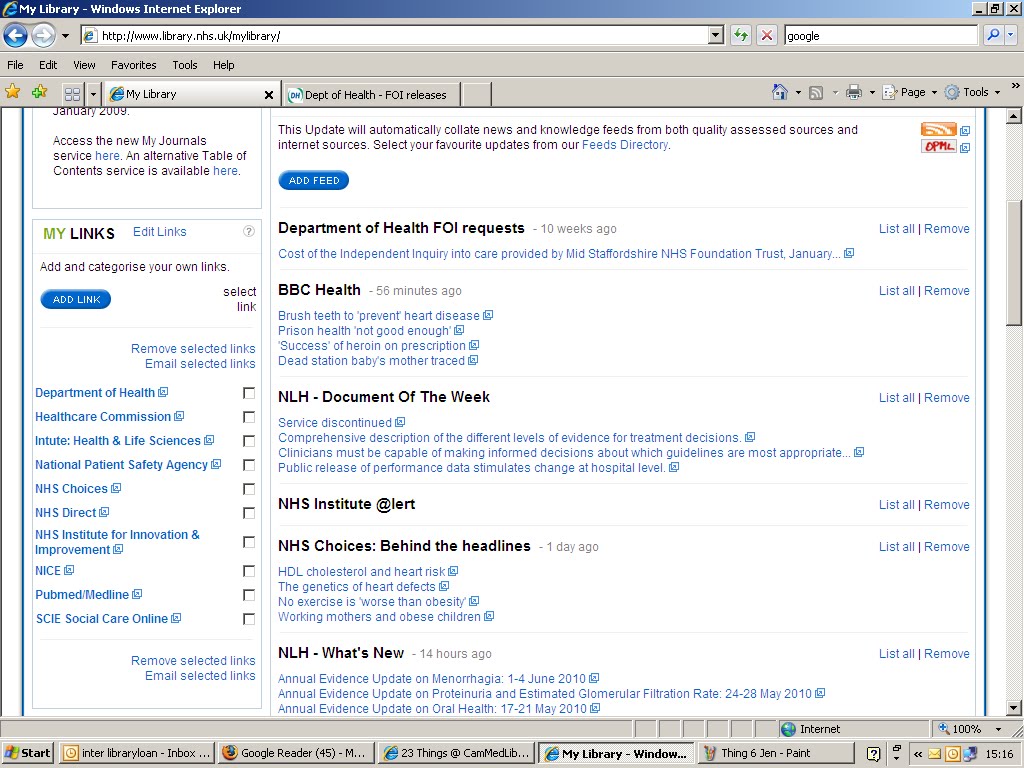
Thing 7 - My NHS MyLibrary RSS reader. I can see how this could be a really good resource for NHS staff as its just one place where they can search for journal articles, keep on top of current health news items etc.
This task has been a great reminder of just how 'simple' RSS can make things! No more trawling through the favourites bar for me then...
Tuesday, 18 May 2010
Thing 4
Thing 4 proved quite troublesome to me as whilst searching Google blogs on the enquiry desk I somehow managed to click on a link that then gave the computer a virus...panic! So 23 things can now also be credited with teaching me a lesson about being careful about what links I click onto! If anyone has any other tips about avoiding viruses (apart from the obvious about having updated anti-virus software) I'd be interested to know!
Drumroll and here is my 'thing 4' found via searching Google blogs...
http://www.blogminster.com - a blog following all MP blogs/tweets and general political drama. (I did originally have something a little more fun but after the virus experience I decided to stick with some snoozy safe politics)
Drumroll and here is my 'thing 4' found via searching Google blogs...
http://www.blogminster.com - a blog following all MP blogs/tweets and general political drama. (I did originally have something a little more fun but after the virus experience I decided to stick with some snoozy safe politics)
Monday, 17 May 2010
Thing 1 and 2

So our first task was to create an igoogle id and personalise our pages which proved to be quite fun. To the right you can see my igoogle page and what my work tab looks like. It looks slightly boring with just the newton widget and the calculator so far...if anyone has any suggestions of what to add, let me know!
 To the left you can see my 'personal' tab on igoogle. It did include a tab with penguins roaming about and also another one with a game...but I found this a bit to distracting!! I think that could be one of the potential downfalls of igoogle and perhaps an interesting discussion point. When does a work sort of tool become a 'not so work' type of tool? I think it would be very easy to cross that invisible boundary. Which I guess is a big plus of using the separate tabs as you can keep work/personal separate or do as you choose. So maybe I'll consider re-adding my poor orphaned penguins!
I also had a look at pageflakes and netvibes - again interesting tools and I can really see the advantages of using these, especially when in a situation where you are using the same computer (enquiry desk etc) and you don't want to lose any of your bookmarks. I personally preferred netvibes..although I'm not entirely sure why...to be continued!
The start of 23 things.
Hello! and welcome to all. This is my first post as part of the 23 Things programme which staff are currently undertaking at Cambridge Medical Library.
A very brief history of Jenni's web 2.0, 23 things 24 year old life so far...
As an 80's child (legwarmers anyone?) I think I've probably always been exposed to some form of computer (probably first beginning at school and then at home) and then I.T lessons at school from about 13. However, I.T still wasn't compulsory at my school about 10 years ago. I think those who wanted to do it at GCSE had to take the classes in their lunchbreak and after school! (Guess who doesn't have GCSE I.T...) So it's quite interesting to see how quickly things have moved on...and how they are constantly moving very fast!
My impressions on 23 Things so far and what I'm looking forward to the most
Some aspects of the 'web 2.0 world' come fairly naturally to me whilst some of it doesn't. Even when looking at the outline of the 23 things programme, I don't really think I used things like google scholar and google advanced search to their potential when I was at university a couple of years ago...it was just plain old google. Infact I think I was one of those students who *shock horror* didn't really even understand the concept of what a journal was at first. Or a library catalogue! (I think in my first two years I just went to my subject section, browsed, and hoped for the best!) This is one of the reasons why I think it's really good we're doing the 23 things...as things move so fast, I'm looking forward to becoming more 'information literate' so I can any answer questions about certain topics more effectively whilst on the enquiry desk...or anywhere!
Over the last couple of years I like to think I've got to grips with things a little better than my school days. I've even recently joined twitter! (although I'm still getting used to it)
I'm most looking forward to exploring the use of googledocs, delicious and podcasts as these are things I haven't ever used much before. Also I'll be really interested in the ebooks week as I had to write an essay on the the pros/cons of ebooks and google books in particular last year... perhaps I'll attach it here when we get to that 'thing' and those of you suffering from insomnia can have a good read...it will be sure to put you to sleep!
A very brief history of Jenni's web 2.0, 23 things 24 year old life so far...
As an 80's child (legwarmers anyone?) I think I've probably always been exposed to some form of computer (probably first beginning at school and then at home) and then I.T lessons at school from about 13. However, I.T still wasn't compulsory at my school about 10 years ago. I think those who wanted to do it at GCSE had to take the classes in their lunchbreak and after school! (Guess who doesn't have GCSE I.T...) So it's quite interesting to see how quickly things have moved on...and how they are constantly moving very fast!
My impressions on 23 Things so far and what I'm looking forward to the most
Some aspects of the 'web 2.0 world' come fairly naturally to me whilst some of it doesn't. Even when looking at the outline of the 23 things programme, I don't really think I used things like google scholar and google advanced search to their potential when I was at university a couple of years ago...it was just plain old google. Infact I think I was one of those students who *shock horror* didn't really even understand the concept of what a journal was at first. Or a library catalogue! (I think in my first two years I just went to my subject section, browsed, and hoped for the best!) This is one of the reasons why I think it's really good we're doing the 23 things...as things move so fast, I'm looking forward to becoming more 'information literate' so I can any answer questions about certain topics more effectively whilst on the enquiry desk...or anywhere!
Over the last couple of years I like to think I've got to grips with things a little better than my school days. I've even recently joined twitter! (although I'm still getting used to it)
I'm most looking forward to exploring the use of googledocs, delicious and podcasts as these are things I haven't ever used much before. Also I'll be really interested in the ebooks week as I had to write an essay on the the pros/cons of ebooks and google books in particular last year... perhaps I'll attach it here when we get to that 'thing' and those of you suffering from insomnia can have a good read...it will be sure to put you to sleep!
Subscribe to:
Posts (Atom)